Snap Jigsaw: free online jigsaw puzzles
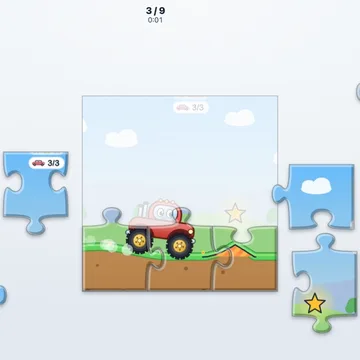
Looking for free online jigsaw puzzles? These pieces really interlock, with knobs and notches like the ones on your kitchen table. Drag a piece close and it snaps into place.
Start with a small puzzle of 9 pieces. Each time you finish one, the next size opens up. The biggest has 100 pieces.
Also called: free online jigsaw puzzles, jigsaw puzzles for adults, online jigsaw puzzle, play jigsaw puzzles, jigsaw puzzles
How to play
- Open the game. The first puzzle has 9 pieces.
- Drag a piece with your finger or the mouse. When it is close to the right spot, it snaps in.
- Pieces that fit together join up, and then move as one.
- Tap Edges to show just the border pieces. They are a good place to start.
- Turn on the Picture guide to see a faint copy of the picture on the board.
- Tap Hint to place one piece for you. Finish the puzzle and the next size opens.
Tips
- Do the edges first, then fill in the middle.
- Group the pieces by color or by one part of the picture.
- Use the picture guide when you need it. You can turn it off again whenever you like.
Questions
Is Jigsaw Puzzles free, and do I need to download anything?
Yes, it is free. Jigsaw Puzzles plays right in your web browser with no download, no sign-up and no ads on the site. Just open the page and start.
Can I do jigsaw puzzles on my phone or tablet?
Yes. Drag a piece with your finger. It works well on a tablet, where the pieces are bigger. On a computer, use the mouse.
How many pieces are there, and can I pick the picture?
The sizes are 9, 16, 36, 64 and 100 pieces. Pick any size you have opened, and any of the 11 pictures.
Is my puzzle saved?
Yes. Your puzzle is saved as you go. If you close the page and come back, you can carry on where you left off.
 Word FiveWord guessing game
 Sweet MatchMatch 3 puzzle
 SolitaireGolf solitaire
 Mahjong PairsTile matching
 Beast TrailPuzzle adventure
 Tiny QuestDungeon crawler
 SlingSlingshot game
 Tower KeepTower defense