Ball Sort Puzzle: play a ball sorting game online free
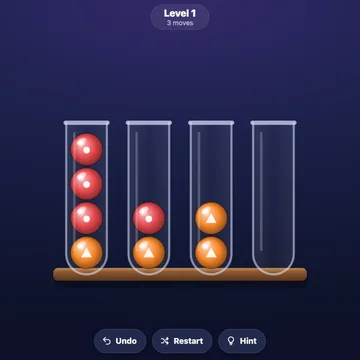
Ball Sort Puzzle is a color sorting game. Glossy balls sit mixed up in glass tubes, and your job is to move them until each tube holds just one color.
Level 1 uses only two colors, so it is easy to learn. Later levels add more colors, up to twelve, and every fourth level gives you one spare tube instead of two, so you have to plan ahead. Undo and Hint are always there.
Also called: ball sort game, color sorting puzzle, sort the balls game, tube sorting puzzle, ball sort
How to play
- Open the game and play level 1. Win a level to open the next.
- Tap a tube to lift its top ball. It springs up.
- Tap another tube to drop the ball in. A ball can go on a ball of its own color, or into an empty tube. Four balls fit in a tube.
- Fill the tubes so each one holds a single color. That wins the level.
- Undo takes back a move, as many times as you like. Hint shows the next move and lights up both tubes. Restart deals the level again.
- Every fourth level is tight, with just one spare tube, and there you can run out of moves. You can undo or start again. On a keyboard, use the arrows to choose a tube, Enter to lift and drop, U to undo, H for a hint and Esc to pause.
Tips
- Free up a tube early. An empty tube is your best tool, so try to keep one open for as long as you can.
- Build on a tube that already has one color on top. A tube with only one color is a good place to gather that color.
- Think before you drop on a tight level. With only one spare tube, one careless move can leave you stuck, so look a few moves ahead.
Questions
Is Ball Sort Puzzle free, and do I need to download anything?
Yes, it is free. Ball Sort Puzzle plays right in your web browser with no download, no sign-up and no ads on the site. Just open the page and start.
Can I play on my phone or tablet?
Yes. Tap a tube to lift a ball and tap another to drop it. On a computer, click, or use the arrow keys with Enter.
Can I get stuck?
On most levels, no. A level with two spare tubes cannot be lost. Every fourth level is tight, with one spare tube, and there you can run out of moves. A card then lets you undo or start again.
Can I tell the colors apart if I am color blind?
Yes. Each of the twelve colors also has its own mark on the ball. The marks are on to start with, and you can turn them off in Settings.
 Word FiveWord guessing game
 Sweet MatchMatch 3 puzzle
 SolitaireGolf solitaire
 Mahjong PairsTile matching
 Beast TrailPuzzle adventure
 Tiny QuestDungeon crawler
 SlingSlingshot game
 Tower KeepTower defense